

Проект неимоверно дешевой миди клавиатуры на 61 клавишу
Нам понадобятся:
ATMEGA2560 = 6$ Aliexpress
https://ru.aliexpress.com/item/1978273967.html?spm=a2g0s.8937518.0.0.33202e0eEBEFAQ
Детский синтезатор с 61 кнопками = 15$
https://ru.aliexpress.com/item/32904347680.html?spm=a2g0s.8937518.0.0.33202e0eEBEFAQ
программатор для ATMEGA = 2$
плата для припайки атмеги = 2$
блок питания на 5В = 4$
мелочевка на пару баксов
провода
паяльник
AVRSTUDIO
PROTEUS
Шарить в программировании))
Фрагмент кода на 8 клавиш
#define _ASSERT_ENABLE_
#include <string.h>
#include "compiler.h"
/**
* \def BUFFER_SIZE
* \brief The size of the UART buffer
*/
#define BUFFER_SIZE 20
// set the correct BAUD and F_CPU defines before including setbaud.h
#include "conf_clock.h"
#include "conf_uart.h"
/**
* \name avr_libc_inc avr libc include files
* @{
*/
#include <util/setbaud.h>
#include <avr/interrupt.h>
//! @}
#include "ring_buffer.h"
// buffers for use with the ring buffer (belong to the UART)
uint8_t out_buffer[BUFFER_SIZE];
uint8_t in_buffer[BUFFER_SIZE];
uint8_t chan=0;
uint8_t onchan=0x90;
uint8_t offchan=0x80;
// the string we send and receive on UART
const char test_string[] = "Kingdom MIDI Board^^!";
//! ring buffer to use for the UART transmission
struct ring_buffer ring_buffer_out;
//! ring buffer to use for the UART reception
struct ring_buffer ring_buffer_in;
/**
* \brief UART data register empty interrupt handler
*
* This handler is called each time the UART data register is available for
* sending data.
*/
ISR(UART0_DATA_EMPTY_IRQ)
{
// if there is data in the ring buffer, fetch it and send it
if (!ring_buffer_is_empty(&ring_buffer_out)) {
UDR0 = ring_buffer_get(&ring_buffer_out);
}
else {
// no more data to send, turn off data ready interrupt
UCSR0B &= ~(1 << UDRIE0);
}
}
/**
* \brief Data RX interrupt handler
*
* This is the handler for UART receive data
*/
ISR(UART0_RX_IRQ)
{
ring_buffer_put(&ring_buffer_in, UDR0);
}
/**
* \brief Initialize the UART with correct baud rate settings
*
* This function will initialize the UART baud rate registers with the correct
* values using the AVR libc setbaud utility. In addition set the UART to
* 8-bit, 1 stop and no parity.
*/
static void uart_init(void)
{
#if defined UBRR0H
// get the values from the setbaud tool
UBRR0H = UBRRH_VALUE;
UBRR0L = UBRRL_VALUE;
#else
#error "Device is not supported by the driver"
#endif
#if USE_2X
UCSR0A |= (1 << U2X0);
#endif
// enable RX and TX and set interrupts on rx complete
UCSR0B = (1 << RXEN0) | (1 << TXEN0) | (1 << RXCIE0);
// 8-bit, 1 stop bit, no parity, asynchronous UART
UCSR0C = (1 << UCSZ01) | (1 << UCSZ00) | (0 << USBS0) |
(0 << UPM01) | (0 << UPM00) | (0 << UMSEL01) |
(0 << UMSEL00);
// initialize the in and out buffer for the UART
ring_buffer_out = ring_buffer_init(out_buffer, BUFFER_SIZE);
ring_buffer_in = ring_buffer_init(in_buffer, BUFFER_SIZE);
}
/**
* \brief Function for putting a char in the UART buffer
*
* \param data the data to add to the UART buffer and send
*
*/
static inline void uart_putchar(uint8_t data)
{
// Disable interrupts to get exclusive access to ring_buffer_out.
cli();
if (ring_buffer_is_empty(&ring_buffer_out)) {
// First data in buffer, enable data ready interrupt
UCSR0B |= (1 << UDRIE0);
}
// Put data in buffer
ring_buffer_put(&ring_buffer_out, data);
// Re-enable interrupts
sei();
}
static inline void noteon(uint8_t data)
{
// Disable interrupts to get exclusive access to ring_buffer_out.
cli();
if (ring_buffer_is_empty(&ring_buffer_out)) {
// First data in buffer, enable data ready interrupt
UCSR0B |= (1 << UDRIE0);
}
// Put data in buffer
ring_buffer_put(&ring_buffer_out, onchan);
ring_buffer_put(&ring_buffer_out, data);
ring_buffer_put(&ring_buffer_out, 0x7F);
// Re-enable interrupts
sei();
}
static inline void noteoff(uint8_t data)
{
// Disable interrupts to get exclusive access to ring_buffer_out.
cli();
if (ring_buffer_is_empty(&ring_buffer_out)) {
// First data in buffer, enable data ready interrupt
UCSR0B |= (1 << UDRIE0);
}
// Put data in buffer
ring_buffer_put(&ring_buffer_out, offchan);
ring_buffer_put(&ring_buffer_out, data);
ring_buffer_put(&ring_buffer_out, 0x7F);
// Re-enable interrupts
sei();
}
/**
* \brief Function for getting a char from the UART receive buffer
*
* \retval Next data byte in recieve buffer
*/
static inline uint8_t uart_getchar(void)
{
return ring_buffer_get(&ring_buffer_in);
}
/**
* \brief Function to check if we have a char waiting in the UART receive buffer
*
* \retval true if data is waiting
* \retval false if no data is waiting
*/
static inline bool uart_char_waiting(void)
{
return !ring_buffer_is_empty(&ring_buffer_in);
}
/**
* \brief The main application
*
* This application will initialize the UART, send a character and then receive
* it and check if it is the same character as was sent.
*
* \note The RX and TX pins should be externally connected in order to pass the
* test.
*/
int main(void)
{
uint8_t data;
uint8_t cnt;
uint8_t i;
uint8_t sta=0xFF, stb=0xFF, stc=0xFF, std=0xFF, ste=0x00, stf=0xFF, stg=0xFF, sth=0xFF, stj=0xFF, stk=0xFF, stl=0x00;
uint8_t pra=0xFF, prb=0xFF, prc=0xFF, prd=0xFF, pre=0x00, prf=0xFF, prg=0xFF, prh=0xFF, prj=0xFF, prk=0xFF, prl=0x00;
uint8_t rta=0xFF, rtb=0xFF, rtc=0xFF, rtd=0xFF, rte=0x00, rtf=0xFF, rtg=0xFF, rth=0xFF, rtj=0xFF, rtk=0xFF, rtl=0x00;
char test_string1[] = "Hi1^^!";
char test_string2[] = "Hi2^^!";
PORTA=0xFF;
DDRA=0x00;//0
PORTB=0xFF;
DDRB=0x00;//1
PORTC=0xFF;
DDRC=0x00;//2
PORTD=0xFF;
DDRD=0x00;//3
PORTE=0x00;
DDRE=0xFF;//out USART and MIDI CHANNEL LED
PORTF=0xFF;
DDRF=0x00;//4
PORTG=0xFF;
DDRG=0x00;//in control
PORTH=0xFF;
DDRH=0x00;//5
PORTJ=0xFF;
DDRJ=0x00;//6
PORTK=0xFF;
DDRK=0x00;//7
PORTL=0x00;
DDRL=0xFF;//out LEDS
cli();
uart_init();
sei();
// Send the test string
for (cnt = 0; cnt < strlen(test_string); cnt++) {
uart_putchar(test_string[cnt]);
}
// Check if we have received the string we sent
cnt = 0;
do
{
pra=PINA;
rta=pra^sta;
for (int i = 0; i < 8; i++)
if (rta&(1<<i))
{
if (sta&(1<<i))
{
noteon(0+i);
}
else
{
noteoff(0+i);
}
sta=pra;
}
//handlerTXUSART();
} while (1);
}
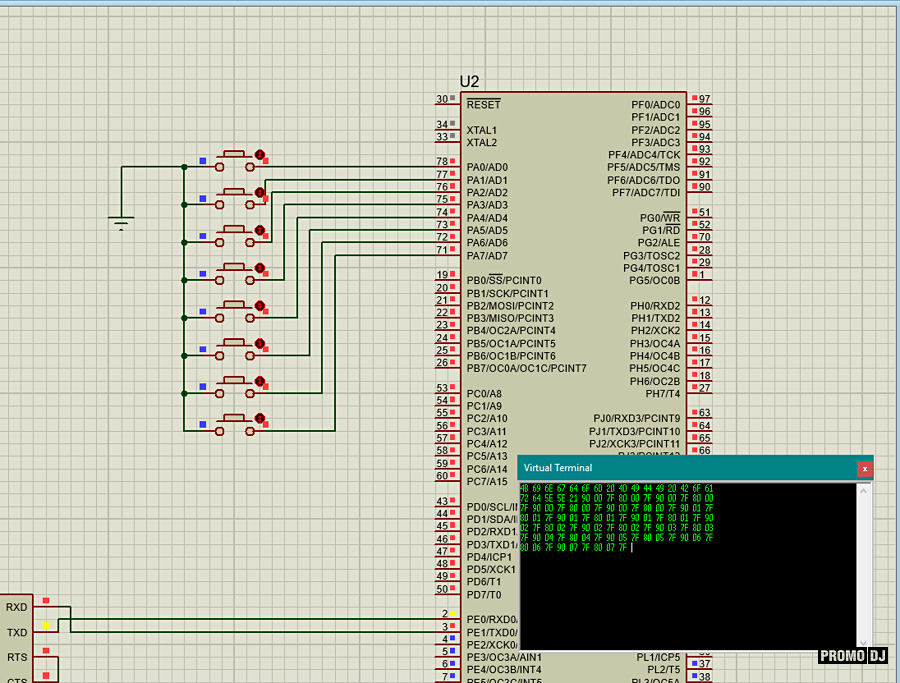
Проект симуляции в протеусе и результат работы отправки миди команд на терминале по нажатию-отжатию каждой клавиши
Следите за новостями))
Comments
Мой алгоритм позволяет запилить на этом чипе до 64-х клавиш с полной полифонией
Позже допишу полный алгоритм на 64 клавиши
cnt = 0;
do
{
pra=PINA;
rta=pra^sta;
for (int i = 0; i < 8; i++)
if (rta&(1<<i))
{
if (sta&(1<<i))
{
noteon(0+i);
}
else
{
noteoff(0+i);
}
sta=pra;
}
Вот это повторить еще 7 раз с нужными переменными
Есть идея на этой основе. Надо будет пообщаться где-нибудь в телеге или скайпе. Думаю, можно нормально денег поднять. Раз у тебя такие навыки.
Я так понял, что сразу две и более клавиш нельзя будет нажать? То есть можно, но на выходе имеем один сигнал?